Voiceuno

Android · iOS

Record once. Understand forever.

A ninety-minute lecture, transcribed end to end. Speech becomes text on your device, so there is no connection to wait for and no meter running. When a line in the summary looks off, tap the timestamp beside it — you hear exactly where it came from.

Free to start. Recording and transcription work with no connection.

The recording screen with a live waveform and a document being written
  • Lecture
  • Meeting
  • Study
  • Idea
  • Interview
  • Memo

Tell it what you are recording and it organises accordingly — concepts and questions for a lecture, decisions and owners for a meeting.

What the app does

There is nothing to do but press record.

Recording

It holds on for the full ninety minutes

Recording continues with the screen off and while you use other apps. An incoming call pauses it and it resumes when the call ends, telling you how much was missed. Speech and silence are counted separately, so you see how long anyone actually talked.
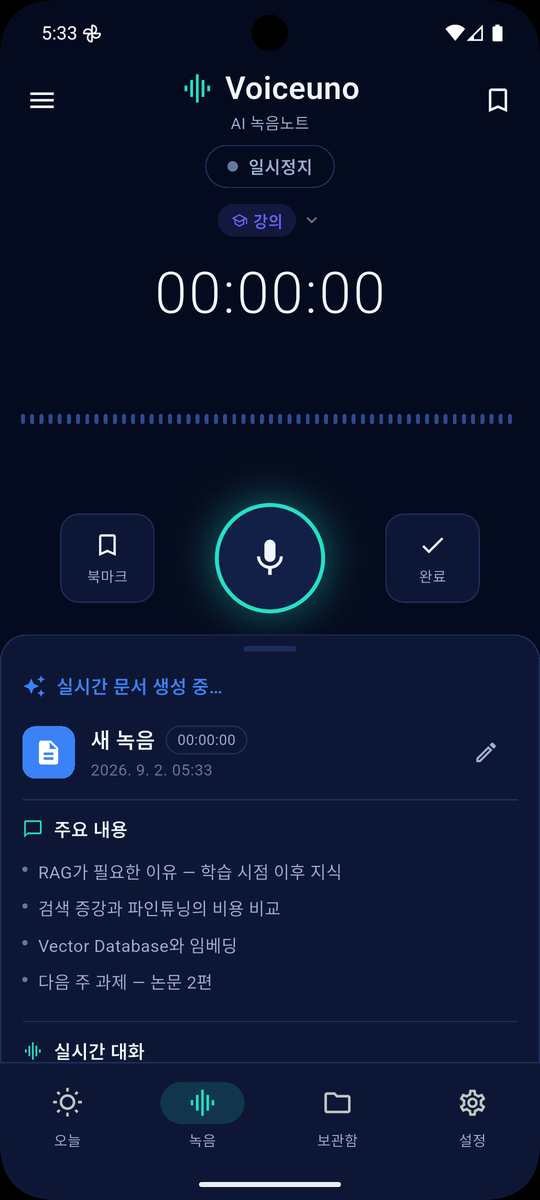
The recording screen with a live waveform and a document being written

Transcription

It runs on your phone, so there is no limit

The recognition model ships inside the app. Nothing is sent to a server, so there is no per-minute cost and no reason to cap you. It works in airplane mode. Korean first, with English, Japanese and Chinese in preparation.

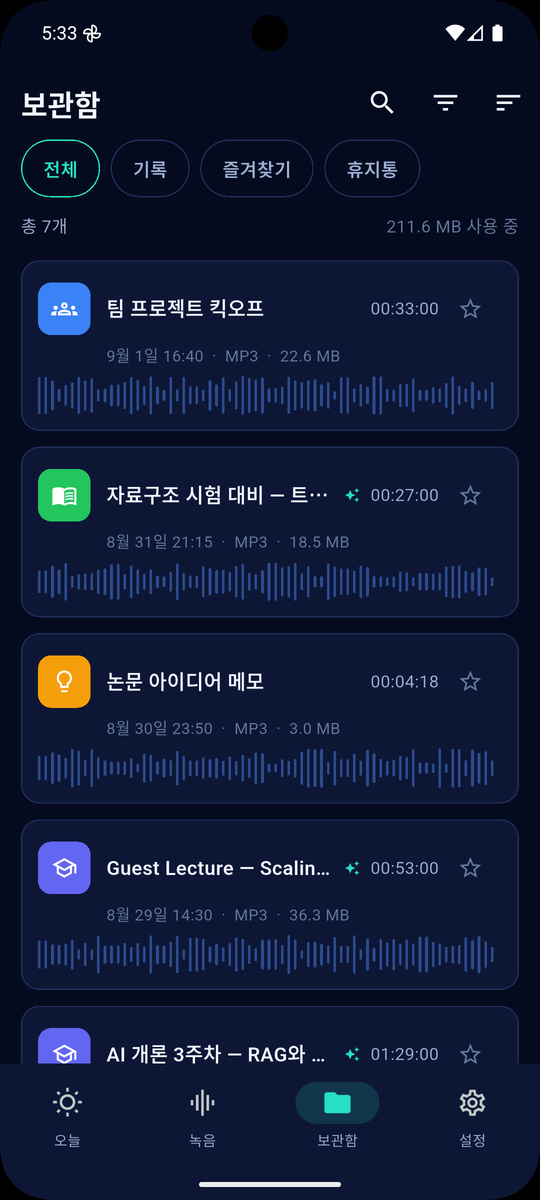
The library, each recording tagged with its mode and waveform

Sources

Tap a summary line, hear the moment

Each line of the AI summary carries the time it came from. Tap it and playback jumps there. Checking whether the summary invented something takes three seconds. The evidence a meeting record needs and the rewind a student wants come from the same mechanism.

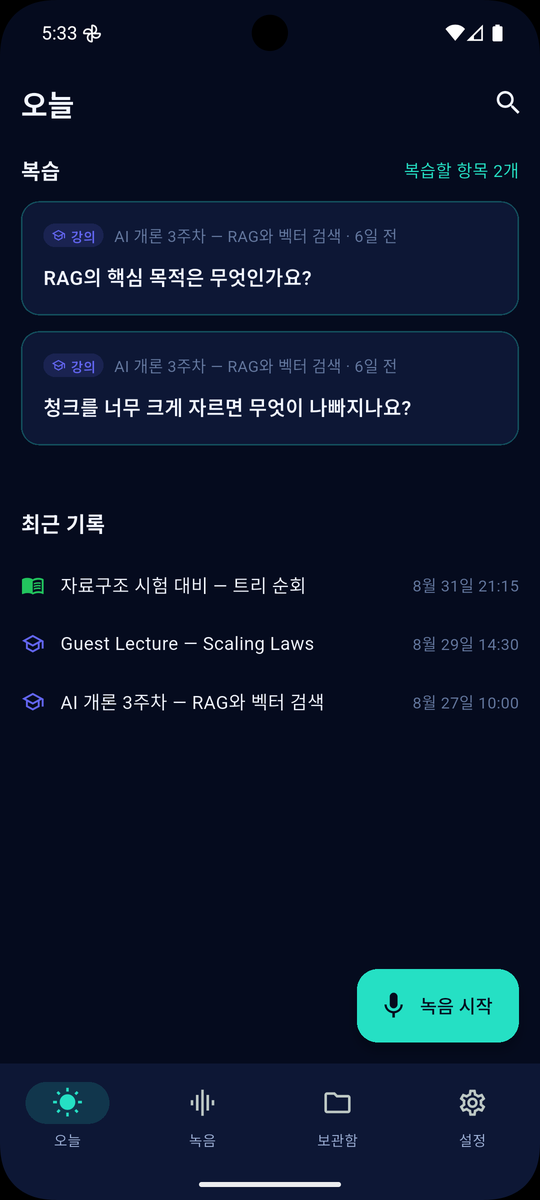
The Today tab with review cards and recent notes

Library

What piles up stays findable

Every recording carries its mode and language, so you can look at only lectures, or only meetings. Favourites and a trash that does not delete immediately. The waveform in the list alone tells you where things got loud.

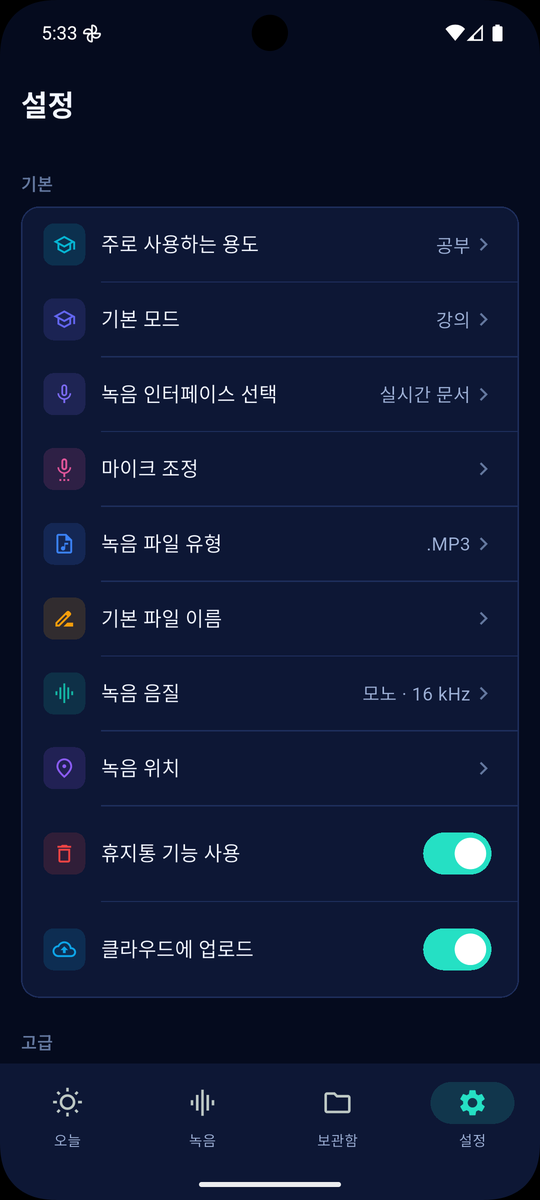
Settings, choosing the recording language and default mode

Modes and language

Say what you are recording

A lecture and a meeting want different notes. Lectures yield concepts and open questions; meetings yield decisions and owners. And the language of the app is not the language being spoken — you can run the app in Korean while recording an English lecture.

  • Lecture · Meeting · Study · Idea · Interview · Memo
  • The mode also sets the microphone — distant for a lecture, close for a memo
  • Recording language is chosen per recording

한국어English日本語中文

The Korean model ships with the app. Other languages download when you need them.

Say what you are recording
The notes are yours

Export

The notes are yours

Summaries and transcripts export as Markdown. Paste into Notion and the headings and checkboxes survive; drop the .md into an Obsidian vault and it belongs there. Timestamps travel with the text, so the source is still traceable in another tool.

  • Copy as Markdown · share as text · save as .md
  • Frontmatter for Obsidian — date, duration, mode, tags
  • Action items as checkboxes, with owner and due date

Small things you end up using

  • Background recordingKeeps going with the screen off.
  • Call handlingPauses for a call, resumes on its own.
  • Speech timeActual talking, silence subtracted.
  • Waveform scrubDrag the waveform to move.
  • Mode filterShow only lectures, or only meetings.
  • TrashDeleted recordings do not vanish at once.
  • FavouritesStar what you will hear again.
  • Dark modeFollow the system, or pin it.
  • Small filesA ninety-minute lecture is about 40 MB.
  • Stop from the notificationEnd a recording without opening the app.
  • Four UI languages한국어 · English · 日本語 · 中文
  • Nothing to joinNo account, no login.

On-device by default

Your recordings never leave the phone

Audio files are never uploaded to our servers, under any circumstances. Turning speech into text also finishes on your device. Only when you ask for an AI summary does the transcribed text pass through a server — and we list that plainly, as the second section of the policy.

  • Audio — on your device only. Never sent.
  • Transcription — on your device. Works offline.
  • AI summary — the one time text leaves. Never the audio.
  • No account. Nothing to sign up for.
  • No call recording. An incoming call pauses the session.
Read the privacy policy
On-device by default audio text AI

Voiceuno Premium

Recording and transcription stay free

What runs on your phone costs us nothing, so we do not meter it. The only thing that costs money is the AI summary, so that is the only thing with a count. Watch an ad for one more, or subscribe and lose the ads.

₩4,900/ month PRO ₩9,900 Pricing is under review and will be fixed at launch. Prices shown are for South Korea.

  • No ads
  • More AI summaries
  • Extended export
  • Future Premium features included

Free forever

  • Recording — no time limit
  • Transcription — offline, unlimited
  • Playback · jump to source · search
  • Markdown export
  • A few AI summaries a day

Questions people ask

Is there a limit on recording length?

No. Transcription finishes on your device, so it costs us nothing and there is no reason to sell it by the minute. Record for as long as your storage allows.

Does my audio go to a server?

It does not. Audio files stay on your device and we cannot read them. When you request an AI summary the transcribed text passes through a server, but the audio itself never does. The full flow is listed in the privacy policy.

Does it work offline?

Recording and transcription work in airplane mode. AI summaries and the ads in the free version need a connection.

Which languages does it understand?

Korean first, with the model bundled in the app so there is nothing to download. English, Japanese and Chinese are in preparation; choosing one of those will download its model.

How do I know if the summary is wrong?

Each line carries the time it came from. Tap it and playback jumps there — three seconds to check. Lines the model could not ground carry no timestamp at all, which is itself a signal.

Can I transcribe recordings I already have?

Yes. Files recorded by other apps, your device’s voice recorder, and call recordings all show up grouped by folder. Pick one and it becomes text just like something you recorded here. Voice messages from KakaoTalk or Telegram work too — just use the share button.

Does importing a file store it twice?

No. Files already on your device stay where they are; the app references them. A 90-minute recording is 43 MB, and copying it would double the space for nothing. If you delete the original, playback stops but the text and summary remain.

Can I speed up or slow down playback?

Six steps from 0.5x to 2x. Reviewing a lecture you already attended goes well at 1.5x; a passage you cannot make out goes better at 0.7x. The transcript scrolls along as it plays, so you can see where you are.

Can I fix a word the app got wrong?

Long-press any line in the transcript to edit it. Proper nouns and jargon are where an on-device model most often slips. Fixing one line is far quicker than rewriting the whole thing.

Can it record phone calls?

No. Call recording is not supported. An incoming call pauses the recording, which resumes when the call ends.

May I record other people?

Laws differ by country, and recording a conversation you are not part of is a criminal matter in many places, including Korea. The app cannot make that judgement for you, so the terms set out where the responsibility lies. Please check before you record.

How does this relate to Snapuno and PDFMon?

Sibling apps from the same company (BUKCS PTE. LTD.). PDFMon opens and reads documents already on your device, Snapuno brings what is on paper onto it, and Voiceuno keeps what was said.

Stop taking notes in the next lecture.

Free to start on Android and iOS.